Showing posts with label Online make money. Show all posts

Tuesday, July 5, 2016

How to Make Money Online with Payoneer Refer a Friend Program

Make money with Payoneer Refer a Friend Program from anywhere in the world. You can make money online through Payoneer Refer a Friend Referral Program. To benefit from this program, first sign up for a Payoneer account, then tell your friends or relatives or anyone in social media or your blog reader to signup for a payoneer account via your unique referral link.

Payoneer allows you to receive your affiliate payment from top merchants globally and they also pay you $25 if you refer someone to signup.

Payoneer is a global finaincial service companies that provide money transfer throughout the world. Payoneer is a registered member service provider of MasterCard Worldwide.  Just like PayPal, Payoneer acts as broad border payment platofrorm that empowers global eCommerce by connecting professionals, businesses, countries and currencies.

Simply put… Payoneer is a payment platform where you can use to receive payment from virtually all freelance sites merchants, and stores from the US.
You can recommend to your friend and in the reward of this the Payoneer team will pay you $25 USD. Hurry up Create Payoneer Account and get your referral link and refer this link to your friend and get 25$ as per Payoneer Account.

How to Make Money Online with Payoneer
 Payoneer is an online global payments company that provides easy solution to make online payments, send and receive money from over 200 countries and also from US companies including PayPal, Amazon, and Facebook etc. Using Payoneer Master Card, you can withdraw your funds from anywhere in the world through MasterCard supported ATM machine.

Payoneer is the best choice to withdraw money from PayPal in unsupported countries like Pakistan, Egypt, and Iran etc. Many people also use Payoneer to verify PayPal account with their US payment service.

Along with these benefits you can also make money with Payoneer affiliate program. A few days back, I had written an article about verification of PayPal account using Payoneer MasterCard. That article was much liked by readers and I also got some referrals.
 
Recently I have got my first commission of 25$ from Payoneer refer a friend program. So, I though why not share this good news with my readers so that they can also get benefit.

You will get an email from Payoneer whenever someone signup for Payoneer MasterCard with your affiliate link. Again you will receive an email when your referral loads total payment of 100$ to his/her account and you will see 25$ bonus in your account. Your referral will also earn 25$ bonus along with you after loading amount of 100$.

Lets Start Sign Up and Earn 25$

How do to Use Payonner to Make money?

Like myself, I use Payoneer account to receive my affiliate payment from many online affiliate programs. I use payoneer account to receive my commission junction affiliate payment, fiverr, infolinks payment, themeforest commission payment and amazon associates payments.

All these are affiliate marketing located in the US. I will be difficult to receive the payment if you are not in US but Payoneer makes it simple to receive the money even if you are not there.

Apart from That, you can make money from Payooner affiliate. This is called “Payoneer Refer a Friend Program”. It’s easy to get started. Follow the signup instructions below.

(1) Signup for Pyoneer Account
(2) Get your unique referral code. Use the code to refer someone to signup. Once the person have upto $100 in his/her account, you will be paid $25 cash.
To get Get the Unique referral code follow the step by step guide below;
(a) Click the “Refer A Friend” Button

How to Use the Payoneer Referral Code to Make $25 for each referral

You unique referral code is a link where you can embed in your blog post or emails. To make money from Payoneer affiliate, you need to have your own blog.

It’s also easy to share your referral code on social media such as Facebook, Twitter and LinkedIn. There are buttons there where you can just click to share your unique referral link on your social media profile.
I have used this to make over $3,000 so far. It’s not hard to do it.
Simply refer a friend to register, after that, don’t sit back. Instead teach your singup how to use the account to receive affiliate payments.

How to Receive Money from Payoneer

Once you signup for payoneer, they will send an MasterCard ATM card to you. You will use the the card to activate the account. After that you can use the ATM card at any ATM machine that allows MasterCard anyway in the world to remove the money.

What to Do to Make Money into Payoneer Account
There are many things you can do online to make money into your payoner account. Personally, I make over $1,000 from Commission Junction every month.

Create Payoneer account and get $25 Bonus 


https://share.payoneer.com/nav/t_BtnEjqD9ZpyxEAtTtu-2Umw8UZ6cIx6GB1XjsE3c_sK-LynghfMTQRSCKUR55etssnUmeCupn2vdpTTaLFgw2
You can decide to join commission junction or do some menial job at Fiverr. It’s up to you to use your God’s given tallent to make money online legitimately.

I also make some few bucks by writing for people on Fiverr. If you know how to write articles or web design, why not join Fiverr to make money from what you know.

You can promote various products on Clickbank, amazon and other popular affiliate programs. The most interesting part is that they pay in dollars.

What if you Are an Author or want to Write a Book?

Perfect if you want to write a book or have it already. Do well to market the electronic copy of your book on popular book stores such as amazon. Sure with the huge web traffic and marketing strategies adopted by amazon, you could make reasonable sales. Then cash your money using Payoneer.

Making money with payoneer partner sites

Payoneer For Photographers

Are you a photographer? Do you know that your local shot can become a source of inspiration to someone in the other part of the world? Sure. I will say yes.
Stop being a local photographer. Use your local shot and sell on the international market.

Okay… even if you are not a photographer, do well to start a professional photography and sell your pictures to international audience.

So what are you waiting for? Give it a try and put your best.
You can don’t have to invest any money apart from your knowledge and time. So, try t and you will be glad you did.
If you have any question, let me know in the comments section below. I will respond asap.

Here are are the keywords: MasterCard Worldwide, ATM Card, Payoneer, Make Money with Payoneer, Credit Card, Payoneer Card, Payoneer Partner, Payoneer Affiliate, PayPal, Commission Junction, eCommerce, Amazon, Fiverr, Make Money Online, Here are are the keywords: MasterCard Worldwide, ATM Card, Payoneer, Make Money with Payoneer, Credit Card, Payoneer Card, Payoneer Partner, Payoneer Affiliate, PayPal, Commission Junction, eCommerce, Amazon, Fiverr, Make Money Online.
Monday, October 26, 2015

Google Adsense

how to Add the ad code to a mobile webpage for Google Adsense

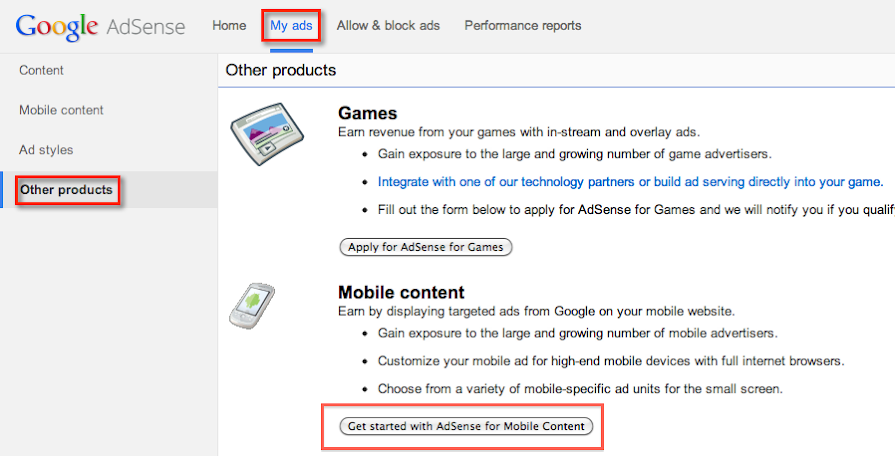
To generate your AdSense for mobile ad code, follow these steps:
  1. Sign in to your account.
  2. Visit the My ads tab.
  3. From the sidebar, choose Other products.
  4. Click Get started with AdSense for mobile content in the window that appears.

    Get AFM code
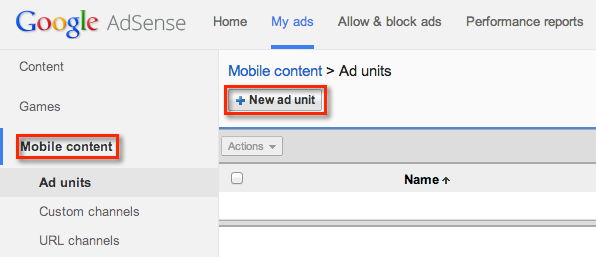
  5. Then, click Mobile content tab which will appear in the sidebar on the left.
  6. Click +New ad unit.

    Create AFM ad unit
  7. Name and customize your ad unit, then click Save and get code.
  8. Copy and paste the code into the source of your mobile webpage in the location where you'd like ads to appear.
Once you've added the code to your page and saved your changes, relevant ads should appear within 48 hours.
Amazon Associates Homepage Image

  To Know More Read Continue exploring Our Site Tour....

Google AdSense Alternatives
If you were disabled from the program, here are some alternate programs you can try...


Media.net
Chitika
Kontera
Infolinks
Clicksor 
Don't ever depend on AdSense as your main income source. Diversify and learn to make money in other ways. 

GOT QUESTIONS?

I'd love to chat with you in my forum where we have tons of discussions about AdSense going on. Register and start chatting with us today!

MAKE MORE WITH ADSENSE BY CREATING NICHE WEBSITES

One of the keys to succeeding with AdSense is to build a niche website that targets a narrowly defined topic. This is the way I've been profiting with AdSense since 2003.
I can show you how to setup a niche website and I dedicate an entire chapter to AdSense and earning strategies in my book, Niche Website Success.
It’s a fear many Webmasters have — getting pulled from AdSense for fraudulent clicks or other activity deemed “against AdSense TOCs”.
The fear is pretty valid. I’ve heard of people getting pulled from the program for “no apparent reason” (according to them).
Of course there are two sides to every story, but it reinforces that Google’s #1 interest is protecting their advertisers, not you, the publisher.
And rightfully so.
Google watches AdSense accounts like a hawk, especially if you’re a new member.
They track IP addresses and monitor for fraudulent clicks on a regular basis. A friend of mine clicked her own ads and was removed from the program within 2 days of joining.
While I have no fool-proof way to ensure your account won’t get dinged, here are some tips to keep you in good graces with Google.

1. REPORT ACCIDENTAL CLICKS

If you accidentally click on your own ads (and people have done this), the best thing to do is report it to Google immediately. In fact, Google even advises you to do this.
If you’re honest and upfront about it, Google probably won’t remove you from the program. Your account may get flagged temporarily and/or you may lose some revenue, but it’s better you report it than having them find out about it.
Just make sure this doesn’t become a habit.

2. STOP TELLING YOUR FRIENDS & FAMILY TO CLICK ON YOUR ADS

Some people join Adsense with the intent of getting rich by having their friends and family click on their ads. While you may think this is pretty fool-proof idea, it’s not very smart or ethical.
First of all, advertisers pay for those ads through the AdWords program. So when you tell people to randomly click the ads, you are throwing their hard-earned money down the toilet. In a way, it’s stealing.
Second, what if Google notices the multiple clicks from the same IP address. Yes, maybe it’s not your IP address, but is it really worth the risk? Plus, I would imagine Google would eventually ignore those clicks anyway.

3. WHEN GOOGLE CALLS…. ANSWER… AND KEEP YOUR RECORDS

Some thieves are not too bright. Once I caught someone who literally ripped off my entire site. Not only did they forget to remove my AdSense code, but they violated the AdSense T&C’s by calling attention to the ads.
Google discovered this site, and because the person was using my AdSense code, they contacted me because they thought it was my site. I explained to them what happened.
After I replied, I didn’t hear back from Google and that made me a little nervous. So I contacted them again and included the previous correspondence.
This time I received an answer and Google told me they added a note to my file that said I was not the owner of the domain that violated the T&C’s. More importantly, I saved this reply for my own records just in case.

4. OBEY THE RULES

Even though Google doesn’t seem to be enforcing this much, they recently added a section to their T&C’s that require any site that uses AdSense to have a Privacy Policy.See the end of Section 1 of their terms and conditions. Many Webmasters aren’t taking this too seriously, but if it’s in their T&C’s then why not take 10 minutes to set it up?
A lot of people feel Google owes them something or they are doing Google a big favor by being an AdSense publisher.

I have no way of knowing how AdSense affects Google’s bottom line, but I can tell you this. Thousands of advertisers are paying to advertise with Google through AdWords, and we know that’s where Google is making its money.
AdWords advertisers funnel thousands of dollars into Google everyday and indirectly earning you money from AdSense. Google’s best interest is keeping them happy, not the publishers. Remember, AdSense publishers aren’t paying Google a cent.
So the next time you try to sneak a click or encourage your visitors to click an ad or two, ask yourself if the 12 cents you’ll gain is worth losing your account for good.
As the AdSense popularity grows among Webmasters, it’s hard to find a site without at least one AdSense unit displayed.
And in my opinion, many Webmasters overdo it.
Because you want to get as many clicks as possible, it can be very tempting to lace your page header with multiple AdSense ads. After all, the more ads, the money you’ll make right?
Not necessarily…
… especially if your site is in a niche that targets Webmasters or other Internet savvy groups. These audiences are often immune to Internet ads in general and are twice as likely to ignore them.
So instead of AdSense becoming an additional revenue stream, it becomes a sign that may suggest you’re more interested in getting clicks than giving useful content.

TOO MANY ADS LOOKS AMATEUR-ISH

Arial of attackdepression.com told me she immediately thinks “amateur” when she comes across a site where the Google ads take up more real estate than the actual content.
And she really hates the sites where you have to scroll down just to see the first line of real content because the AdSense ads are in the way.
I have to agree. First impressions are everything. And if your visitors first impression of your site is “too many ads and not enough info”, you’ve immediately lost some interest, credibility and perhaps a repeat visitor.
Your visitors shouldn’t have to dig through your ads to find your content.

MAXIMIZE BUT DON’T OVERDO IT

Don’t get me wrong. I think you should maximize your AdSense revenue potential by using multiple AdSense units – that’s why Google allows up to three.
Just make sure they don’t overpower your site’s layout and you have good content to supplement the ads.
Remember, it’s your content relevance and site usability that keeps people interested and encourages them to return – not your advertisements.
So rather than being so eager to show off your AdSense ads with the contrasting bright yellow background, why not show them why your site is worthy of a bookmark and a return visit. There’s no better way to do that than through useful info and site usablity.

ADSENSE AWARENESS

These days Web surfers are much more ad conscious than they were years ago. And with the media stories that have flooded newspapers and news programs, it’s getting harder to find people who don’t know a little something about “making money with Google ads.”
In other words, people are much more aware, and it’s getting easier for the average surfer to spot a greedy Webmaster.
A few years ago, more people would click ads out of curiosity or confusion. These days the only click many surfers are making is the “Back” button because they know exactly what this Webmaster is up to.
It’s all about balance. There’s nothing wrong with using 3 AdSense units on a page. And there’s certainly nothing wrong with having them highly visible to increase the chances of a click thru.
But if your ads overpower your content, and it becomes obvious you’re only out to make a fast buck, is it really worth the loss of credibility and a potential repeat visitor?
AdSense should supplement your content, not BE your content.
It doesn’t matter how you slice it. Content has and will always rule. And I’d much rather sacrifice a few clicks with the hopes they will find my site useful and want to return again.
And should they happen to click an ad in the process of browsing my site, that’s an added bonus!
And who knows, maybe on their next visit they’ll make a purchase that is worth a whole lot more to me in commissions than 8 cents from an AdSense ad click.
AdSense is a wonderful, lucrative program. But don’t let the dollar signs overshadow what it really takes to make a site succeed for the long haul.
What I did was so simple, I’m almost ashamed to dedicate a post to this. 
I hope you forgive the simplicity of what I’m about to reveal, but sometimes the simplest changes make the greatest impact.
In early November I added a 728×90 unit to the header of my Site Build It! site, Flat Stomach Exercises.  That unit began earning around $40 per day for the first few days and then leveled off to $30-ish per day.
I’ve also had decent success with the same unit on my forum, WebsiteBabble.com.  The banner doesn’t convert nearly as well there, but it still does OK and is worth the placement.
Note: I attribute the lower performance to the fact that WebsiteBabble.com is targeted to Webmasters and Bloggers who often have ad blindness.  So it’s no surprise that unit doesn’t perform quite as well there.
I had been reading about how well the 728 unit performs on many sites and thought of adding a unit to 2 Create a Website, but was afraid it would distract from my overall sales goals.  However, I am less concerned about that on Flat Stomach Exercises (FSE).
FSE is primarily an Adsense site for me.  As many of you know, I created that site to do a test run with Site Build It! so I could use it as a case study/example on 2CreateAWebSite.com.
To be honest, I’m not as passionate about fitness to work on the site frequently (not to mention I don’t have the time), so I just let it sit and earn passive income.  I never dreamed that test/case study site would perform so well with limited content updates.
So I’m OK with being a little heavy on AdSense ads with that site.  Not sure I would use that same strategy on 2 Create a Website because I have other goals, and I have to be careful AdSense doesn’t become a major competitor for the main products I promote.

UNDERSTAND WHEN ADSENSE MAKES SENSE FOR YOU

It’s tempting to read this post, dart over to your AdSense account and create a 728 unit for your site.  That’s fine if the primary goal is to earn money with AdSense, but that may not be your best move.
AdSense may be the primary monetization option for some sites, yet more of a supplement for others.  You have to decide which one it is for you.  Adding more units to your pages may actually distract and compete with other products you are  promoting.
For example, say you are earning $500/month in commissions by referring a product on a specific page.  After adding the 728×90 unit, your AdSense earnings increase by $100/month, but commissions for the main product you promote drops to only $200 per month.
In this example, the AdSense banner probably hurt your net earnings.  I say “probably” because it may be hard to prove that was the exact cause, but if you see drastic results after making a change like that, AdSense may be the culprit.  That’s why you should testeverything.
This is the very reason some people choose to only put AdSense ads on pages that have high bounce rates and pages that don’t promote their “important” products.
So you should always look at the big picture for your site.  If your AdSense earnings are increasing rapidly, are sales for something else declining?  These are statistics you should pay attention to, and it’s the reason some people don’t use AdSense on certain pages if at all.
Always know your individual site goals and make sure your monetization decisions support them.  Believe it or not, a boost in your AdSense earnings may not always be a good thing for your bottom line.
How well an AdSense unit performs on a site depends on several different factors…
1) The page the unit is on
2) Ad relevancy
3) Amount and quality of traffic to the site/page
4) Placement of unit
So I am by no means about to suggest that one size fits all in regards to the units. However, I would like to open up a discussion on what you’ve learned about placement.
I recently tweeted that I am having great success using the 300×250 Medium Rectangle unit alongside my YouTube videos. On certain pages, my click-thru rate has quadrupled.
I actually got this idea from Google. One of their optimization experts suggested this on my site over a year ago.  Not sure what took me so long, but I am now implementing this on more pages and the results have been fab.Let’s talk about what you’ve learned about placement and/or color experimentation.  Done anything different to give your earnings a boost?  Please share!
Clicksor the Best Adsense  2015

Clicksor the Best Adsense 2015

Clicksor @ Best Adsense Alternatives for 2015

Here is our Clicksor review. Clicksor is a contextual ad network. This means that it uses certain keywords and phrases that are in the body text of your webpage to determine which ads display. Clicksor offer some unique ad types with numerous sizes available which some ad networks do not provide, making them attractive to publishers as an adsense alternative.
sign-up

Clicksor @Action

Clicksor offers five different ad types to publishers to include on their website or blog. The first is perhaps the most unintrusive to visitors as it does not actually appear on the webpage at all.

PayPerView

clicksor pop unders
For those with a decent amount of traffic coming from search engines who are struggling getting visitors to click ads then Clicksor’s pay per view pop-under ads might just be the ads for you. When a visitor lands on your site, an ad will pop up underneath your page, invisible to the visitor. The visitor will not see the ad until the moment they close their browser.

clicksor interstitial
The Interstitial ads operate in a similar way as they also take up no ad space and are pay per view. 
The difference being that they appear as visitors are browsing between the pages of your site. 
You have control over the frequency at which the ads display to suit your preferred level of visitor experience.

PayPerClick

clicksor text links
Clicksor is pretty transparent when it comes to sharing the average PPC in which their current publishers achieve. We have found their PPC rates for the intext and banner ads are generally lower than that found on other ad networks, but with their unique ad sizes you can achieve a higher click through rate by being creative with where you place the ads.

clicksor text banner
clicksor graphical banner

Many people using the internet today are seeing google-like adverts on most webpages which have been inserted in the same areas of the screen. By having slightly different ad sizes than usual and in interesting places across your site, a high click through rate can be achieved.

Clicksor Review

Clicksor review websites very quickly and approval is pretty much immediate. They do allow you to have ads from other networks on the same page as long as you only have a maximum of three ad units from Clicksor. If you are going to use more than one ad network on the same page, we believe the PopUnder would be the best option as it would be the most non-intrusive and it will not lower your current earnings or click through rates. For this reason Clicksor is a decent adsense alternative.
Also if you are using a 3rd party ad network and choose to use the Intext or banner ads from clicksor along side, please ensure that the ads do not look the same as this could infringe on some of the 3rd parties terms and conditions and could result in a loss of all your earnings from them.

Clicksor CPM and PPC Rates $$$$$$$$$$$$

FORMATSCOST METRICSAVERAGE REVENUE
iconText Adscost/pay per click (CPC, PPC)$0.035 per click
iconrichGraphical / Rich Media Bannerscost per 1000 Impressions (CPM)$0.20 per 1,000 impressions
icongraphGraphical Bannerscost per click (CPC)$0.035 per click
popunderPop-underscost per visit (CPV)$0.0025 per visitor
interstitialInterstitial Adscost per interstitial (CPI)$0.0025 per interstitial Ad

Getting Started with Clicksor

Clicksor is very easy to install. They offer a plugin for WordPress, Blogger, Drupal and Joomla. There is also the option to place the code inside your site yourself, preferably in the header or footer. This option can be slightly confusing to do, as you must go through each ad type separately and it is not immediately obvious how to select the ads you want. Basically, for the ads you do not wish to display simply click the “skip this ad” at the bottom and for the ads you wish to display click “save and continue”. It will generate the code for you at the end then its just a case of copying and pasting.

Powered by Blogger.